What a child’s iPhone looks like with iOS 27’s new parental controls
Apple has offered parental controls on the iPhone for years, and for most of that time they worked in reverse.
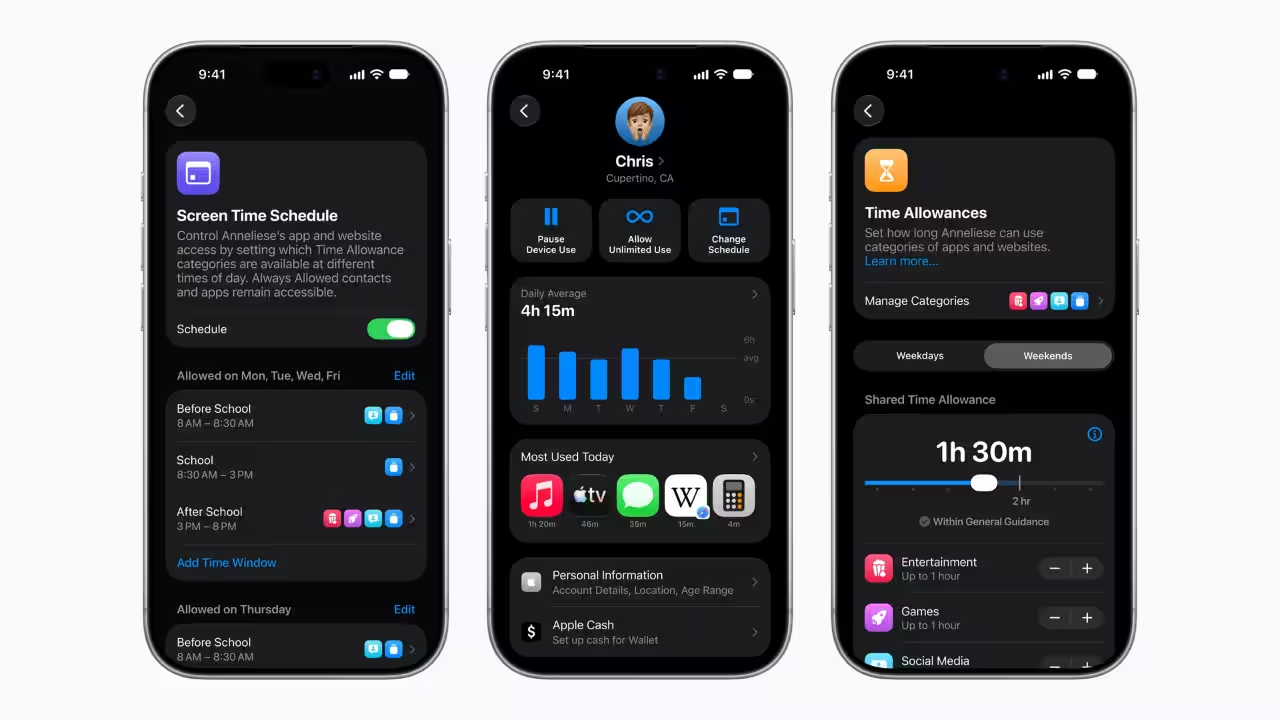
Apple has offered parental controls on the iPhone for years, and for most of that time they worked in reverse. A child got a fully stocked phone, and a parent spent the following weekend inside Screen Time menus, switching off whatever didn't belong. The tools did their job, but only after the phone had already changed hands.iOS 27, which brought Apple's reworked parental controls to iPhone, iPad and Mac last month, moves most of that work to the very start. What a child unlocks is a phone that asks before it does almost anything new, whether that's installing an app, opening a website or adding a contact. The more useful thing to understand, for any parent setting one up, is where that asking stops.A child's iPhone now begins with only the apps a parent choseSetup starts with a Child Account, which Apple requires for anyone under 13 and allows up to 18. The account does a fair amount on its own. Adult websites are limited, films and music are held to age ratings, and the App Store applies age-based restrictions before a parent has touched a single toggle.The visible change comes a few screens later, where a parent now decides which apps exist on the phone at all. Apple offers three routes: a bare set of essentials such as Phone, Find My and Mail, a starter set it recommends for the child's age, or a list built one app at a time. Even Apple's own built-in apps are up for selection, so a seven-year-old's iPhone no longer has to carry the Stocks app simply because every iPhone does.The home screen a child sees on day one can hold half a dozen icons.Everything after that arrives by request. Ask to Buy, an older feature that carries straight into iOS 27, sends every App Store download, free or paid, and every in-app purchase to a parent for approval. Put that alongside the new setup, and there isn't an app on the phone a parent hasn't signed off on.That also puts a lot of weight on what a parent approves. Saying yes to WhatsApp or Instagram means saying yes to an entire world of people and content that Apple's own approval system doesn't reach, which is where the rest of this update comes in.The asking is tightest inside Apple's own appsAsk to Browse brings the Ask to Buy logic to Safari. Tap a link to a site the child hasn't visited before, and a request screen appears in place of the page, while the parent gets a message with the link so they can look the site over first. It is on by default for under-13s, and works the same way on a child's iPad and Mac. For teenagers, it stays off unless a parent switches it on, which seems like the sensible default. A 15-year-old researching a school project would otherwise send a request every few minutes, and a parent stuck in a meeting would be the one fielding them.Contacts follow the same pattern across Messages, FaceTime and the Phone app. A child who wants to add a new tuition teacher or a friend from the school bus sends a request, and a parent approves it with a tap. Contact approvals existed last year too, but iOS 27 folds them into setup, so the list is agreed on before the first call goes out.Then there is the part where a parent's yes or no doesn't come into it. Communication Safety, on by default for anyone under 18, already blurs nudity in Messages and FaceTime and asks the child whether they still want to see it. With iOS 27, violent and gory photos and videos are blocked outright, whether the child is sending or receiving them, including during live FaceTime calls. Apple has made that call on the parent's behalf.All of this is strongest inside Apple's own apps, though. Ask to Browse covers Safari, and contact approvals cover Messages, FaceTime and Phone. In India, where a child's social life is far more likely to run on WhatsApp than iMessage, that boundary matters. Apple does give developers the tools to plug into the same system, from blurring sensitive images and routing new in-app contacts to a parent, to tailoring an app to a child's age range without ever seeing their birthday, but each app has to adopt them. Until the apps a child spends most time in do that, the approval that matters is the one made at the App Store.Apple now has a view on how much screen time is enoughTime Allowances, which replace App Limits, split a child's apps into Games, Entertainment and Social Media, with a daily ceiling for each. What's new is that Apple suggests the numbers. Based on the child's age and expert research, a parent sees a recommended allowance for every category, which they can keep, raise or cut. The guidance draws on health experts including the American Academy of Pediatrics, whose Family Media Plan Apple is adapting into a guide for families.It is a small change built on a fair assumption, that most parents would rather start from a number than a blank field. The categories are Apple's too, so where an app lands decides which allowance it eats into, and a video app used for maths revision counts the same as one used for cat clips. Schedules work alongside all this, greying out restricted apps during school hours or any other window a parent sets.The parent's side is built for decisions that can't waitThe parent's side has been rebuilt for decisions made in the moment. Tap a child's name under Family in Settings, and Screen Time now opens on average daily use and the most-used apps, with three buttons up top to pause the device, allow unlimited use or change the schedule, none of which touch the allowances underneath. They're meant for dinner, a long drive, or a child pleading for ten more minutes to finish a level, which is when most screen-time decisions get made anyway. Screen Time Passcode Notifications, meanwhile, alert a parent if their passcode is entered on the child's device, a quiet admission that children are rather good at watching fingers.There is one condition attached. Every device in the Family Sharing group, a parent's Apple Watch included, needs to be on the latest software for the new Screen Time to work, and Apple says some features won't be available in every region or language.What a child unwraps on iOS 27, then, is a smaller phone than the one their parents carry, and one that asks before it grows. The work that used to happen in Settings after the handover now happens before it. What's left for a parent is the one decision Apple can't make for them, which apps get approved in the first place, because past that point, how much asking happens depends on the app.You use AI every day. Now get your AI Quotient. Take the AIQ test.
Topics in this story
Gathered from external sources. Rights to this text belong to whoever originally published it.