iPhone 18 Pro Reference Image mode explained: How Apple plans to prove your photos aren't AI
Tech News News: Apple has built a way for iPhone 18 Pro users to prove a photo is real. The feature, called Apple Reference Image, makes the main camera sensor crypto.
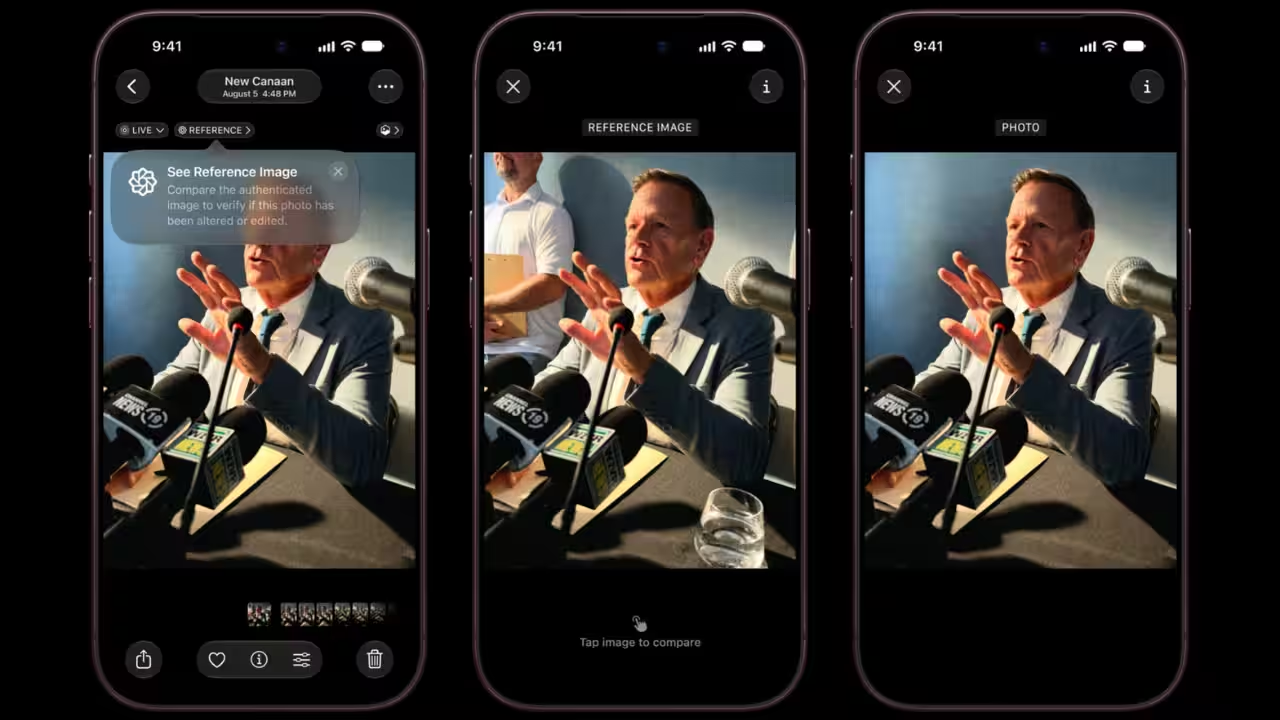
Apple has built a way for iPhone 18 Pro users to prove a photo is real. The feature, called Apple Reference Image, makes the main camera sensor cryptographically sign pixel data the moment a picture is taken, before any software on the phone can touch it. The signed capture is then processed on Apple's Private Cloud Compute servers into a verified image that sits next to the regular, editable photo in the Photos app.Apple announced the feature at its iPhone 18 Pro and iPhone Duo launch event last week. It has now explained how it works in detail on its Security Research blog, comparing the output to a digital film negative. With AI tools able to create or alter photorealistic images in seconds, Apple says a picture looking real is no longer enough to prove something actually happened.How iPhone 18 Pro locks a photo before software can touch itIt starts with a new Reference mode in the Camera app. Switching to it reboots the sensor into a secure state where its firmware cannot modify pixel data. The sensor then signs each frame with a private key it generated at the factory and never shares. Details that come from outside the sensor, such as digital zoom and focal length, are signed separately by the iPhone's Secure Enclave.Time gets its own check. Instead of trusting the phone's clock, the iPhone collects a cryptographic timestamp roughly every 15 minutes. That marks the earliest possible capture time. After the shot, it requests a second timestamp as the latest possible time, so Apple can confirm the photo was taken between the two.All of this is saved on the phone as a "secure digital negative" in DNG format. It can stay undeveloped indefinitely and can be shared in that state too.When a user develops it, the negative goes to Private Cloud Compute. The servers verify the signatures, confirm the sensor and Secure Enclave belong to the same iPhone, and use a neural network to score whether the data looks like real sensor output. They then process the colour and tone, compress it into a signed JPEG and send it back. The negative moves to deleted photos and is purged after 30 days unless recovered.Why Apple's photo verification is tougher to fake than current standardsExisting systems built on the C2PA standard sign images at the end of the processing chain. Apple says that leaves room for fake pixel data or a hacked operating system to alter a picture before it is signed. Signing inside the sensor closes that gap.The final signature pairs RSA-3072 with the post-quantum ML-DSA-87 algorithm. Apple claims no other image verification system offers quantum-secure protection, which should keep a photo taken this year verifiable for decades. If fraud surfaces, Apple can revoke a single image or every image from a specific sensor.Reference Image proves a photo is real without revealing who took itThe verified images carry no public photographer credential. Nobody can tell who took a photo, which device was used, or whether two reference images came from the same phone. Apple points to photographers working in conflict zones as the reason. It also says it cannot see the image itself, and timestamp requests are routed so the service never learns the phone's IP address.There are limits. The mode is opt-in, works only with the main camera and does not cover screenshots. Users in the European Union cannot capture reference images at launch, though they can develop and view them on iOS 27, iPadOS 27 and macOS 27. The feature will not be available in China initially due to regulatory requirements.Developers are getting a Reference Image API, and Apple is adding support for Google's SynthID watermark to flag AI-generated images. How far Reference Image goes in restoring trust will depend on how many apps and platforms choose to check for it.Focus keywords: Apple Reference Image, iPhone 18 Pro Reference mode, prove photo is real, AI-generated images, Private Cloud Compute, photo verificationGet the latest technology news and updates. Download the TOI App.
Topics in this story
Gathered from external sources. Rights to this text belong to whoever originally published it.