Birdbuddy’s budget feeder foiled my squirrels
Birdbuddy’s newest smart bird feeders are cheaper, faster, and sleeker, but the new camera might be a deal-breaker for diehard birders.
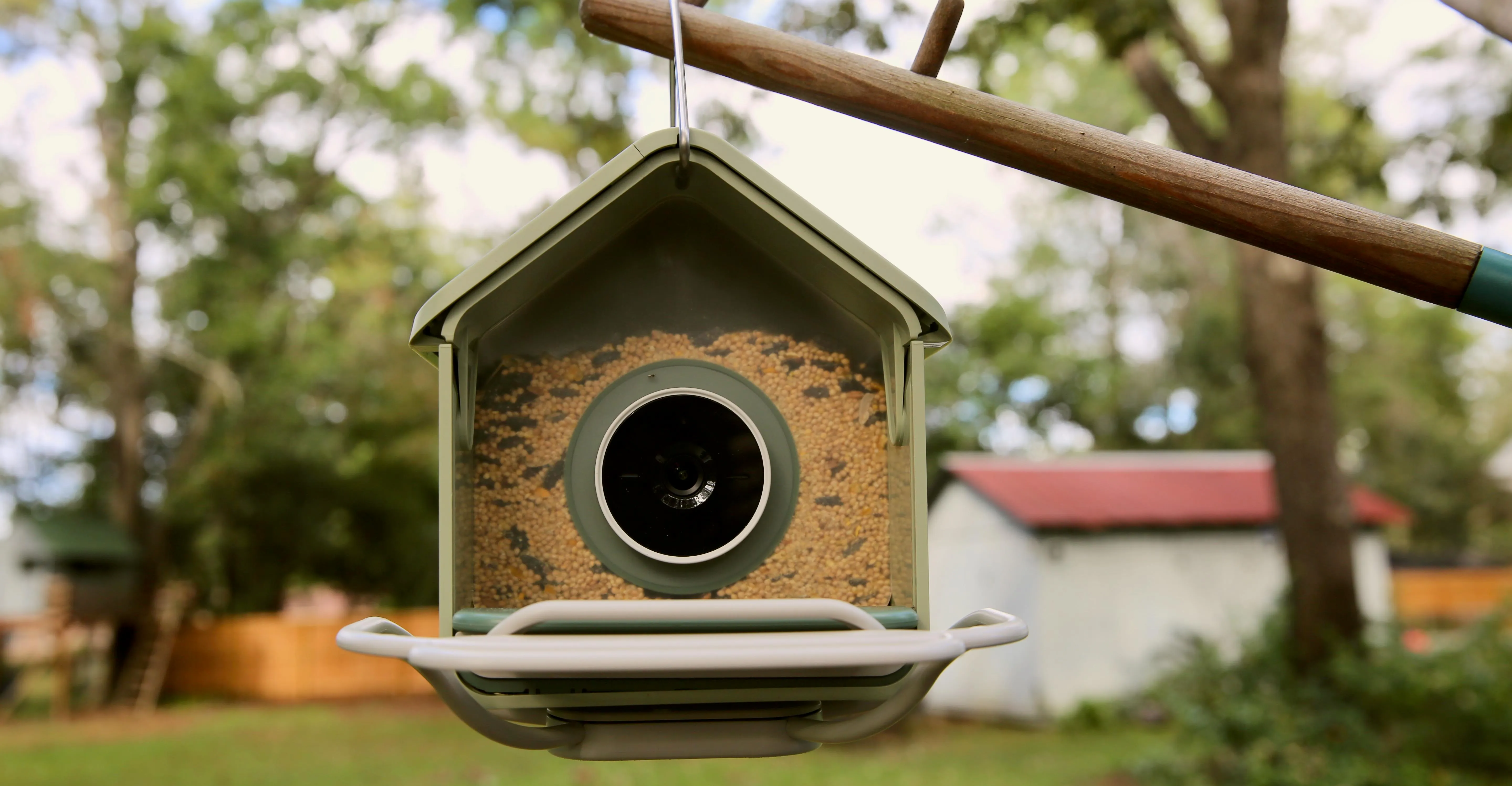
Birdbuddy’s next-generation smart bird feeders have finally arrived. After spending a few days with the BirdBuddy Nook (from $99) and longer with the flagship Birdbuddy Home ($219), there’s a clear winner: The Nook is the perfect all-rounder, just the right blend of technology, nature, and value to bring you delightful scenes from the lives of your backyard birds. But — and this is a pigeon-sized but — the new camera on both the Nook and the Home is a bit of a downgrade compared to the Birdbuddy Pro ($339, but often on sale for less). It has slightly worse viewing angles, the 2K HDR image quality isn’t as crisp or bright, and you now have to remove the whole feeder to charge it. On the plus side, you can now rotate the new camera to capture a wide-angle 135-degree landscape view. The live feed loads much faster in the Birdbuddy app thanks to a new instant wake-up feature. In testing, the livestream appeared in under eight seconds, compared to about 30 on the Pro. That’s the difference between seeing a bird up close in real time and watching its tail feathers fly away. [Image: The Birdbuddy Nook (left) with optional perch extender ($43), and the Birdbuddy Home (right). For those unfamiliar, smart bird feeders use an AI-powered camera to capture photos and videos of visiting feathered friends (and the occasional unwanted furry beast). First announced at CES in January under different names, the Birdbuddy Nook and Birdbuddy Home follow the company’s hugely successful Birdbuddy (2022) and Birdbuddy Pro (2024). They have completely new designs featuring the new camera, but the headline feature is that both are more affordable than the Pro, which Birdbuddy has now discontinued. (It’s currently selling for $239.99 on Amazon.) New tech that’s cheaper? In 2026? Bravo, Birdbuddy. [Product: Birdbuddy Nook | [Product: Birdbuddy Home | [Product: Birdbuddy Pro (solar) | Birdbuddy’s new camera is the biggest change, but it comes with some compromises. As you can see in the videos below, the new portrait mode has a slightly narrower view of the feeder than the Pro, so while you get close-ups, the bird’s face can get cut off if it’s standing on the edge of the feeder. In the new landscape mode (which the Pro doesn’t offer), the view cuts off the seed tray. So, while you get a wider view that’s better for seeing more bird activity, you no longer see the feed tray — resulting in more feathers but fewer up-close faces. [Video: BirdBuddy Testing 1] [Video: Bird Buddy Testing 2] Despite the reduced angle and less vivid color, the camera is still very good; the images are clear and colorful, with plenty of detail, and the company says it’s optimized for better action and low-light shots — though I haven’t seen that in my testing. I also really like the landscape option; it’s one of the reasons I enjoyed the Coolfly model I tested earlier this year. While portrait gives you an intimate up-close look, landscape captures more of the scene, including birds in flight and interacting. (You have to manually change the angles by repositioning the camera; you can’t do it through the app.) [Media: A montage of videos from the Home (blue tray/red perch) and the Nook (green tray/white perch) in portrait and landscape views. Birdbuddy’s excellent app shows you the videos and photos the camera captures in a fun “feed,” where you can scroll through all your backyard visitors and manually initiate free, AI-powered species identification. To have the app automatically identify birds, you need a subscription ($7.99 a month or $69.99 a year), which also lets you name returning visitors and put silly augmented-reality hats on them, which was a lot more fun than I expected. Birdbuddy’s identification has been very good overall, though I’ve noticed the new camera struggles to identify some smaller, faster birds compared to the Pro. [Image: [Image: [Image: [Image: [Image: [Image: [Image: [Image: While the camera is the same on the Home and Nook, the feeders differ. The easiest way to sum this up is maintenance. The Home is more hands-off: it holds six cups of seed compared to just under four on the Nook, has built-in solar, so you won’t have to take it down to charge as often, and supports 5 GHz Wi-Fi, while the Nook is only 2.4 GHz. The Home is also slightly bigger, with a larger seed tray, so it may attract larger birds. In addition to the $99 base model, the Nook has two models with add-ons that bring it closer to the Home feature-wise: Nook Solar for $159 (with only one panel compared to two on the Home), and the Nook Extended Edition for $199, with solar and a perch extender to accommodate more visitors (you can buy the perch separately for $43). That’s the model I’m testing, but it’s just $20 less than the Home. If you’re tempted by those upgrades, I’d stick with the Home for its larger seed capacity and two solar panels. [Image: [Image: [Image: [Image: The Nook is pitched as better for balconies and small spaces, whereas the Home is better for bigger yards. And I get that. The Nook is smaller, with a smaller perch and a smaller seed tray than the Home. But in my few days with it in my big backyard, the Nook’s better value beats out the Home’s convenience upgrades. Also — and this could be its killer feature — the Nook fully foiled my squirrels. Its smaller seed tray and perch seem to make it harder for them to balance (even harder if you don’t add the extended perch). I have a video where you can hear them trying to clamber onto it and giving up, whereas they got down to dinner in the Home with its deeper seed tray. (However, your squirrel mileage may vary!) Birdbuddy had a strange rollout for the Home (originally called Birdbuddy 2), releasing it to existing customers through its app a few months ago in what felt like a beta test. It seems there were a lot of kinks to work out. When I installed the Home earlier this year, I initially had trouble with Wi-Fi connectivity and battery life. But firmware updates seem to have fixed most of it. This summer, after one update, the Home’s battery lasted around three months; I only had to recharge it after a period of overcast days. [Image: The Home (blue) holds almost twice as much seed as the Nook (green) and uses two solar panels to keep the battery charged. I had no Wi-Fi connectivity issues with the Nook, and both models paired to the app much faster than the Pro. I’ve only had the Nook for a few days, so it’s too early to judge battery life. However, recharging both devices is more involved than with the Pro because you have to remove the entire camera housing, which sits inside the bird seed compartment. It’s easier to just remove the whole feeder and take it inside. The good news is that the Home is much easier to refill with birdseed without spilling it everywhere than the Pro is, thanks to a wider mouth and larger reservoir. The Nook is even easier, since you take the entire roof off to add seed — though, again, this requires removing it from its perch. You can pole-mount or hang both devices using the included hardware. One problem I have noticed with the new designs is that the roof on both no longer fully covers the seed tray, as it does with the Pro. This lets in more light for the camera, but it also means the seed gets wetter when it rains. [Image: [Image: If you are looking for your first smart bird feeder, or for a great holiday gift for your nature-loving friend or family member, the Nook is an easy buy. Upgrade to the Home if you really don’t like refilling seed and recharging batteries. If you want to add solar to the Nook, buy that up front — you can’t currently purchase the solar roof as an accessory. If you’re an existing Birdbuddy user, there are two reasons to upgrade from the Pro. First, if you’re having any issues with missed videos or slow livestream loading. Both new models load faster and capture video more reliably. Second, battery life. I had to charge the Pro every couple of weeks, even with solar. The Home got three months. Today, I wouldn’t recommend buying a Pro, even if you can find one. While I prefer its portrait camera angle and it has slightly better video quality, the connectivity and battery life of the new models are worth those compromises. I’d rather see more birds more often than a bit more of a bird less often. Birdbuddy Home ($219), Nook ($99), and Nook Solar ($159) are available now at mybirdbuddy.com and ship next month. The Nook Solar and Nook Extended Edition ($199) will be available at Target, Best Buy, and Walmart later this month. Photos, video, and screenshots by Jennifer Pattison Tuohy / The Verge
Topics in this story
Gathered from external sources. Rights to this text belong to whoever originally published it.